iPhone・iPad・Android 向け・順番待ちの受付と呼び出し

番号札を出して、
次の人を呼ぶ。

混む時間の受付で、紙の整理券を切って、ホワイトボードに番号を書いて、大きな声で呼ぶ。「よびだしボード」は、それをスマホ1台に置きかえるアプリです。番号を出す、次の人を呼ぶ、来なかった人を飛ばす。お客様には、近くの iPad や使っていない iPhone、テレビに「ただいまの呼び出し」を大きく出せます。

App Store・Google Play で見る(準備中)

買い切りの有料アプリです。一度買えば、すべての機能が使えます。アカウント登録・アプリ内課金・サブスクリプション・広告はありません。
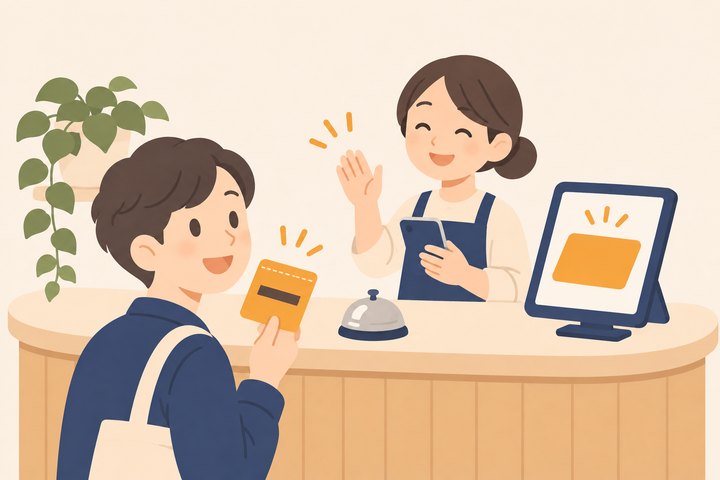
カフェの受付で、スタッフがスマホを持って手を上げ、番号札を持ったお客さんが振り向いている。カウンターの端のタブレットに札の形が大きく光っている絵

こんな困りごとのために作りました

アカウントが作れない・ログインできない

登録もログインもありません。開いたらその場で受付を始められます。お店の名前と窓口の数を決めるだけです。

2台目の画面と番号がそろわない

受付のスマホと、お客様向けの画面(iPad・iPhone)を、近くの端末どうしで直接つなぎます。サーバーを通さないので、ネットが無い場所でも動きます。正しい番号はいつも受付の端末にあり、表示の端末はそれを映すだけです。切れたら自動でつなぎ直します。

済んだ人が一覧に残り続ける

済んだ人・来なかった人・取り消した札は、待ちの列から外れます。数と時刻は記録に残るので、あとで何人に対応したかが分かります。

待ち時間の目安がずっと同じ

実際に呼んだ間隔から1人あたりの時間を出し、呼ぶたびに出し直します。窓口が2つなら、そのぶん短くなります。

大きな声で呼ぶのがたいへん

呼ぶとチャイムが鳴り、「A 12番のお客様、1番窓口へお越しください」と読み上げます。日本語・英語・両方から選べます。もう一度呼ぶことも、来なかった人を飛ばすこともできます。

押しまちがえた

番号を出しすぎた、ちがう人を呼んだ。そんなときは[前に戻す]で、最後の操作を1つ戻せます。

できること

番号を出す番号は1から順に(始まりの番号と頭の文字 A〜Z を決められます)。名前と人数は入れても入れなくても
呼ぶ窓口ごとに[次の人を呼ぶ]。待ちの列から好きな人を呼ぶ・呼び直す・来なかった・取り消す・前に戻す
窓口1〜10。名前と色を決められます
お客様向けの表示ただいまの呼び出し番号(窓口ごと)・お待ちの組数・目安の時間・次に呼ぶ番号・お店の一言。同じ端末で開く/近くの iPad・iPhone につなぐ/AirPlay や HDMI でつないだテレビに出す。縦でも横でも
知らせ方チャイムと読み上げ(日本語・英語)。読み上げる端末(受付・表示・両方)を選べます
記録日ごとの発行・済み・来なかった・取り消し・平均の待ち時間・時間帯ごとの人数
そのほか設定のロック(Face ID・パスコード。お客様が触っても設定を変えられない)・6色のテーマ・iPad と iPhone Duo の広い画面では、呼んでいる番号と待ちの列を左右に並べます

受付の記録は端末の中だけに置きます。お客様の名前は、受付を締めると消えます。くわしくはプライバシーポリシーへ。

For iPhone, iPad and Android · Queue tickets and calling

Hand out a number.
Call the next guest.

At a busy front desk you tear paper tickets, write numbers on a whiteboard and call them out loud. QueueBell replaces all of that with one phone: hand out a number, call the next guest, skip anyone who didn't show. Your guests see "Now serving" in big numbers on a nearby iPad, a spare iPhone or a TV.

On the App Store and Google Play (coming soon)

A one-time purchase unlocks everything. No sign-up, no in-app purchases, no subscription, no ads.

At a café counter, a staff member holding a phone waves while a guest holding a numbered ticket turns around; a tablet at the end of the counter shows a large glowing ticket

Made for these problems

Can't create an account or sign in

There is no sign-up and no sign-in. Open the app and start right away: just name your shop and choose how many counters you have.

The second screen shows the wrong number

The front-desk phone and the guest screen (iPad or iPhone) link directly to each other, nearby. No server, so it works without the internet. The correct numbers always live on the front-desk device; the display only mirrors them, and it reconnects on its own if the link drops.

Finished guests never leave the list

Served, no-show and cancelled tickets leave the waiting line. Counts and times stay in your records, so you can see how many people you served.

The wait estimate never changes

The time per guest comes from how quickly you actually called people, and it updates every time you call. With two counters, it gets shorter.

Calling out loud is tiring

A chime plays and a voice announces "Number A 12, please come to counter 1." Choose Japanese, English or both. Call again, or skip a guest who isn't there.

Tapped the wrong button

Handed out one too many, or called the wrong guest? Undo takes back the last action.

What it does

Hand out numbersNumbers go up in order (set the first number and an optional letter A–Z). Add a name and party size if you like
Call"Call next" for each counter. Or call anyone from the line, call again, mark as no-show, cancel, or undo
Counters1 to 10, each with a name and a color
Guest displayNow serving (per counter), groups waiting, estimated wait, the next numbers and a message from your shop. Open it on the same device, link a nearby iPad or iPhone, or show it on a TV over AirPlay or HDMI. Portrait or landscape
AnnouncementsChime and voice (Japanese and English). Choose which device speaks: front desk, display or both
RecordsPer day: handed out, served, no-shows, cancelled, average wait and guests per hour
AlsoSettings lock (Face ID or passcode, so guests can't change settings) · six theme colors · on iPad and iPhone Duo's wide screen, the current call and the waiting line sit side by side

Your records stay on your device. Guest names are erased when you close the day. See the Privacy Policy.